How it works
One link. One page. One thread.
This is a real order on a shop running Vaani, screen by screen — the customer’s side and the seller’s. The three phone screens below are captures of the live storefront, not mockups.
The shop is a link
No app to install. No account to make. No password to forget.
The seller has one link, and it opens their shelf — every item, its unit, its price. It works on a five-year-old phone on a bad connection, because it is a page, not an app. Paste it in a status, a group, a bio, an ad. That is the whole storefront.
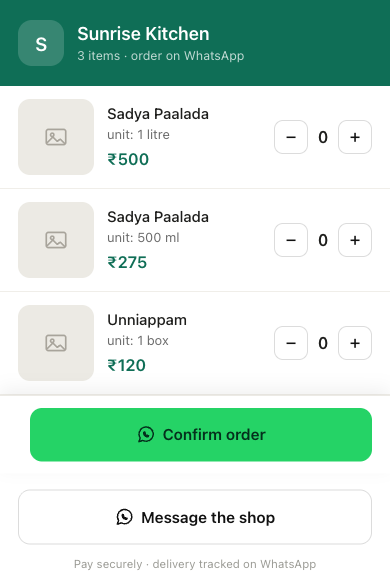
Pick everything on one page
Rows and steppers. Tap plus. The total follows you down the page.
There is no product page to open, no cart to visit, no basket icon to hunt for. Quantities change in place, the picked rows light up, and a running total sits on the bar at the bottom of the screen — so the number a customer is about to commit to is never more than one glance away.
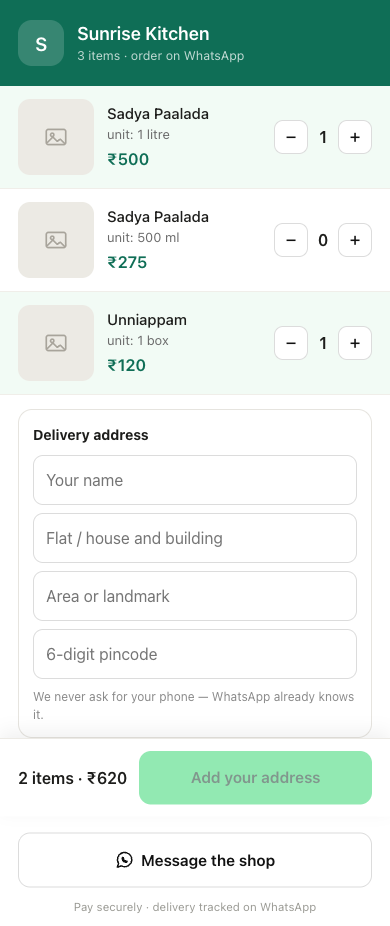
One address — and never a phone number
“We never ask for your phone — WhatsApp already knows it.”
Name, building, landmark, pincode. That is the entire form, and it appears only once something is actually in the cart. The line under it is the product's whole argument in one sentence: the order is about to arrive over WhatsApp, so the number is already known, and asking again would be theatre.
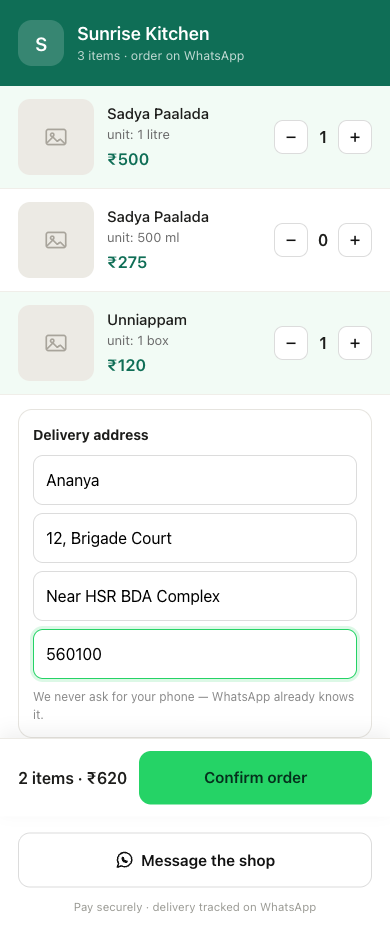
Confirm hands off to WhatsApp
The cart is already written into the message.
Confirming opens WhatsApp with the order encoded in the text — the customer sends it and the conversation is already about their specific basket. Nothing is retyped, nothing is read back, and the customer never leaves the app they were going to use anyway. From here the whole order lives in one thread.
happens inside WhatsApp
The seller is told the moment an order exists
Accept or reject, from the same chat.
The order does not sit in a dashboard waiting to be noticed — it arrives on the seller's WhatsApp as it happens. They accept it, or they reject it with a reason, by replying. There is no separate app for the shop owner either, which is the point: both sides of the sale run on the one tool both sides already have open.
happens inside WhatsApp
A rejected order that was paid gets refunded
Sold out at 9pm should not mean an argument at 9am.
If the seller rejects an order that has already been paid, the refund is requested first, and only a gateway that confirms it lets the order read refunded and the customer be told their money is on the way back. If the refund errors, the order stays paid and the seller is told plainly that it did not go through — because the one unforgivable version of this is a customer reading that their money is coming when nothing was ever asked of the gateway.
happens inside WhatsApp
About these screens
Captured from the live storefront on 3 August 2026 on a 390 px phone viewport. The shop’s name and initial were changed, because the storefront belongs to a real seller and naming them here would imply an endorsement they were never asked for. Nothing else was edited — including the grey placeholders where that seller has not uploaded dish photos yet. Steps 04–06 happen inside WhatsApp and are written out rather than staged as screenshots.
Want this on your number?
Setup happens in one WhatsApp chat — shop name, a photo of your product list, a location pin, payouts. Message us and we’ll walk you through what it would look like for what you sell.